When Browser Extensions Become AI Data Exfiltration Tools
Organizations are securing their AI platforms: access controls, DLP policies, acceptable-use agreements. But few have looked at the browser layer itself. That gap is where extensions operate, and where sensitive AI session data is most exposed.
When an employee opens ChatGPT, Claude, Gemini, or Microsoft Copilot, the browser becomes the workspace. Everything typed, pasted, or displayed in that session is visible to the browser, and to anything running inside it, including extensions.
Security researchers have demonstrated that a browser extension with standard permissions can scrape entire AI conversations as they happen, extract credentials and secrets from pasted content, and ship that data to an external backend without triggering a single alert. No exploit required. No elevated privileges. Just a normal-looking extension doing what extensions are designed to do.
This is a gap that most enterprise AI security strategies have not yet closed.
The Browser as the Blind Spot
The security conversation around enterprise AI has mostly focused on two questions: what data does the AI provider retain, and who inside the organization is permitted to use which tools. Both matter. Neither covers the full picture.
The browser is the actual interface where AI interactions happen. It renders conversations, processes user input, and displays model responses. That rendering layer sits below the AI platform's own security controls and above the network layer where DLP tools typically operate. It is a blind spot, and browser extensions operate squarely inside it.
Extensions are granted access to the DOM, the live rendered content of every page, as a standard part of their function. A grammar checker, a productivity tool, a tab manager, or a theme extension can all, with the right permissions, read what is displayed on screen. When that screen contains an AI chat session, the extension can read the entire conversation.
How Extensions Read AI Conversations
Most users encounter the extension permission dialog once, at installation. The phrase that should prompt the most scrutiny is: "Read and change all your data on the websites you visit." For extensions granted this permission, no further access is required to observe AI sessions.
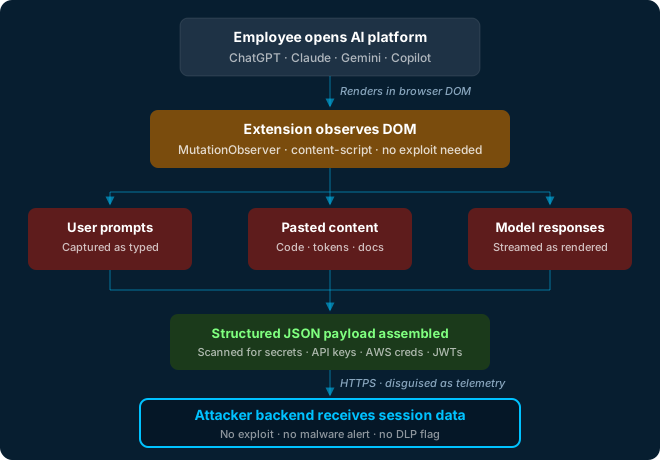
The technical mechanism is straightforward. Modern browsers expose the Document Object Model to extension content scripts running in the page context. A technique called MutationObserver allows a script to watch for changes to the DOM in real time, including new content rendered as the AI model streams a response. This is the same mechanism used by accessibility tools and productivity extensions.
A malicious or compromised extension can use this to:
- Capture user prompts as they are typed
- Record model responses as they are rendered
- Extract any content pasted into the chat window, including code, logs, credentials, or documents
- Identify the platform being used and the user's account details
- Scan captured text for patterns matching API keys, AWS credentials, JWTs, and database connection strings
- Transmit collected data to a remote backend, potentially disguised as legitimate telemetry
What Employees Are Pasting Into AI
AI tools have changed what flows into browsers. The productivity promise of these platforms (generating code, summarizing documents, drafting communications, analyzing data) means that sensitive material now moves into chat windows at scale.
Consider what a typical knowledge worker might share with an AI assistant during a single day:
- Internal source code submitted for review or debugging
- Database queries or schema definitions
- Customer records, incident reports, or support tickets
- Authentication tokens or configuration files pasted for troubleshooting
- Internal communications, meeting notes, or strategic documents
- Error logs containing environment variables or access keys
In each case, the AI platform may be fully approved and compliant. The data may never leave the provider's secure environment. But if a browser extension is present with DOM access, that same data was captured before it reached the platform, and may have already been transmitted elsewhere.
The AI platform is not the exfiltration point. The browser is.
Why Traditional Controls Fall Short
Several properties of browser extension behavior make this risk category difficult to detect with conventional security tooling.
DLP limitations
Data loss prevention tools typically monitor network traffic at the perimeter or endpoint level. Extension-based exfiltration can use HTTPS to reach endpoints that appear legitimate, such as analytics or telemetry services. The traffic pattern of small, structured, periodic JSON payloads is difficult to distinguish from normal extension behavior. If payloads are signed to mimic a known analytics provider, DLP may classify the traffic as benign.
EDR visibility
Endpoint detection and response tools see process activity, but browser extensions operate inside the browser process. Unless the EDR has specific browser instrumentation, extension behavior may be invisible at the process level. The browser itself is behaving normally; it is simply running code the user installed.
User perception
Users typically cannot distinguish a malicious extension from a legitimate one after it has passed Chrome Web Store or Edge Add-ons review. Extensions can be published as genuinely useful tools, accumulate downloads and positive reviews, and later introduce malicious behavior through an update. A user who installed a productivity extension six months ago has no reason to question it today.
Inventory gaps
Many organizations do not maintain a complete inventory of browser extensions installed across their workforce. Unmanaged personal devices, BYOD policies, and the ease of extension installation mean the extension surface is often unmapped and unmonitored, a control gap that would not be acceptable for any other category of endpoint software.
Defensive Steps
Implement extension allowlisting on managed devices
Managed browser policies in Chrome (via Google Admin or Intune) and Edge allow administrators to permit only approved extensions by ID. This prevents users from installing unreviewed extensions on corporate devices without eliminating tools that serve legitimate business functions. An allowlist approach is more effective than a blocklist for a category of risk this broad.
Use a dedicated browser profile for AI work
A separate browser profile, or a dedicated browser instance, used exclusively for AI tools limits the extensions with DOM access during sensitive sessions. If that profile carries no productivity extensions, the attack surface for AI session scraping is significantly reduced with minimal friction to the user.
Audit and inventory installed extensions
Establish visibility into what extensions are running across the organization. Chrome and Edge both support enterprise reporting. Prioritize review of extensions with broad host permissions, especially those installed from outside official stores or with limited review history. Treat an unmapped extension surface the way you would treat an unmapped network segment.
Include AI session hygiene in acceptable-use guidance
Users should understand that the browser environment is not the same as the AI platform's security boundary. Guidance should explicitly address what types of data are appropriate to paste into AI sessions and should treat AI chat as an unencrypted workspace from the browser's perspective, even when the AI provider is fully approved and compliant.
Monitor extension update behavior
A trusted extension can become malicious through an update. Extension management policies that require IT review before updates apply, or that alert on permission escalation in an update, provide a check against supply-chain compromise of previously approved tools. Most organizations have no such control in place.
Apply zero-trust principles to the browser layer
Treat installed extensions as external code with broad access. An extension a user installed has not been reviewed by the security team unless a process requires that review. Default to minimum necessary permissions, treat broad DOM access as a risk factor rather than a standard feature, and document extension approvals the same way you document third-party software approvals.
Final Thoughts
The investment organizations are making in enterprise AI security is real and necessary. Governance frameworks, data classification policies, provider agreements, and employee training are all meaningful. But security coverage that ends at the AI platform boundary leaves a significant gap open.
The browser is where AI interactions actually happen. It is also where extensions operate, and where users paste the most sensitive content they handle on any given day. An attacker does not need to compromise the AI provider to access that content. They need an extension with standard permissions and the willingness to wait.
For defenders, this reinforces a principle that applies across the security landscape: coverage must follow the data, not just the system where the data is stored. In AI environments, that means the browser layer deserves the same scrutiny as the platforms it connects to.