From LinkedIn to Local Shell
How social engineering is evolving into user-assisted code execution
Modern attacks are increasingly skipping traditional exploitation entirely. Instead of targeting vulnerabilities, attackers are combining social engineering with controlled execution paths, guiding users to run malicious commands themselves.
A recent campaign illustrates this clearly. Attackers posed as venture capital firms on LinkedIn, targeting professionals in the crypto space. Victims were invited to meetings through spoofed platforms and ultimately tricked into executing commands directly on their own systems. No exploit was involved. The user completed the attack chain.
How the Attack Works
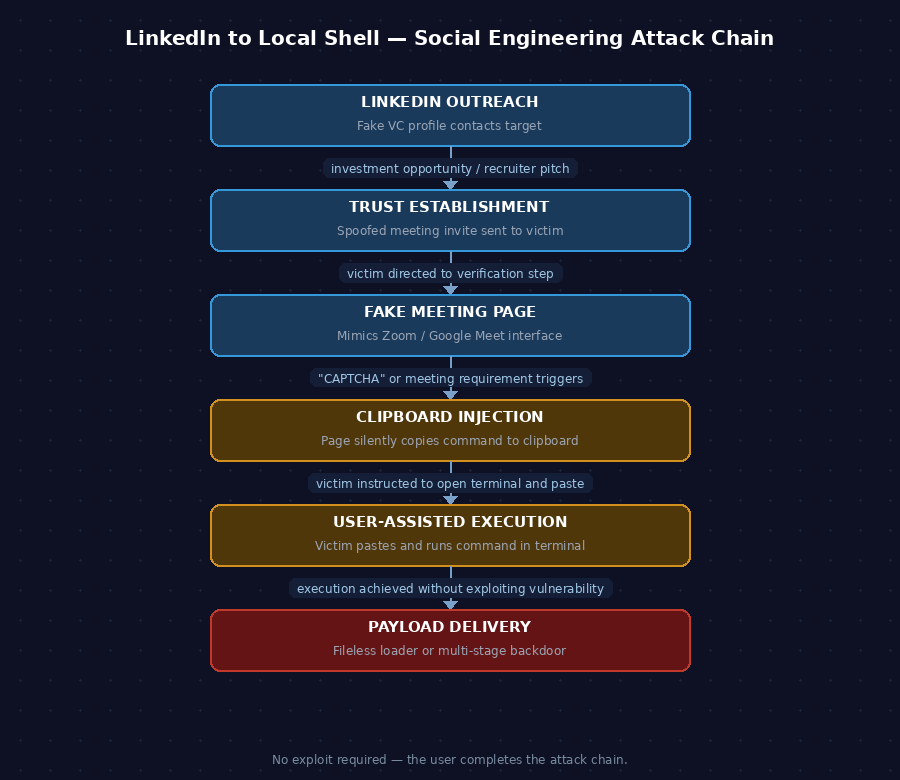
The attack unfolds in six stages:
- Initial Contact — Fake VC profiles reach out via LinkedIn with investment or networking pitches.
- Trust Establishment — Victims are directed to a spoofed meeting page resembling Zoom or Google Meet.
- The Verification Step — A fake CAPTCHA or meeting requirement prompts the victim to take action.
- Clipboard Injection — The page silently copies a malicious command to the victim's clipboard.
- User-Assisted Execution — The victim is instructed to open a terminal and paste the command.
- Payload Delivery — On Windows, a fileless PowerShell loader runs. On macOS, a multi-stage Python payload executes.
Why This Works
Each step in the chain looks routine on its own: opening a meeting link, completing a verification, pasting a command. Combined, they form a full attack path.
Security controls are largely ineffective here because there is no malicious file, no exploit, and no suspicious attachment. Execution is initiated by a trusted user on a legitimate terminal. Most endpoint and network tools have nothing obvious to flag.
The social context does additional work. Targeting professionals with relevant, believable scenarios — investment opportunities, recruiter outreach — reduces suspicion early and keeps victims engaged through the full chain.
Defensive Takeaways
Educate against command execution from unknown sources
Users should never paste commands from unknown sources or trust verification steps requiring terminal access. Awareness training should specifically address this pattern — it is designed to bypass technical controls entirely.
Monitor command-line activity
Track encoded commands, unusual parent-child process relationships, and shell execution from browsers. PowerShell Script Block Logging and process creation auditing are prerequisites for detecting this behavior.
Restrict script execution policies
PowerShell execution policies and application control tools like AppLocker or Windows Defender Application Control (WDAC) add meaningful friction. A fileless loader still needs to run — restricting what can execute limits the attack surface significantly.
Treat social engineering as a technical threat
LinkedIn outreach and fake meeting platforms are now part of the attack surface, not just email. Detection and response programs that focus only on technical indicators will miss campaigns that rely on behavioral manipulation as the primary delivery mechanism.
Final Thoughts
The critical insight from this campaign is straightforward: the user is no longer just a target. In this model, the user is part of the execution chain. The attacker's ability to reach payload delivery depends entirely on social engineering succeeding at each stage.
That shifts the defense calculus. Technical controls remain important — encoded PowerShell detection, process monitoring, application control — but they operate downstream of the decision that matters most: whether the user pastes the command. Security programs that treat awareness as a soft add-on rather than a primary control layer are poorly positioned against this class of attack.